

Free
$0/ month
3% per order, $0.15 minimum, $10 maximum
For new and part-time shops
DTF gang sheet builder for Shopify
Your customers upload their art, tap a shirt size, and the sheet is arranged and priced automatically. It works on a phone, and you get a print‑ready file on every order.
How it works
Most gang sheet orders are a few logos in a few sizes. EZGangIt makes that case fast, and keeps a full editor ready for everything else.
PNG, JPG, PDF or SVG. Each design gets a quality check the moment it lands.
Tap a shirt size instead of typing inches, then set copies. Exact sizes are always one field away.
The sheet is arranged automatically, nested tight, and priced live. One more tap adds it to the cart.
Then it's yours to press. The order lands in Shopify with a 300 DPI print file attached, labeled and named the way your shop works.
Proven on real orders
We built EZGangIt for our own print shop. Every gang sheet order at Dallas DTF House in Grand Prairie, Texas runs through it.
Build a sheet there yourselfOn desktop
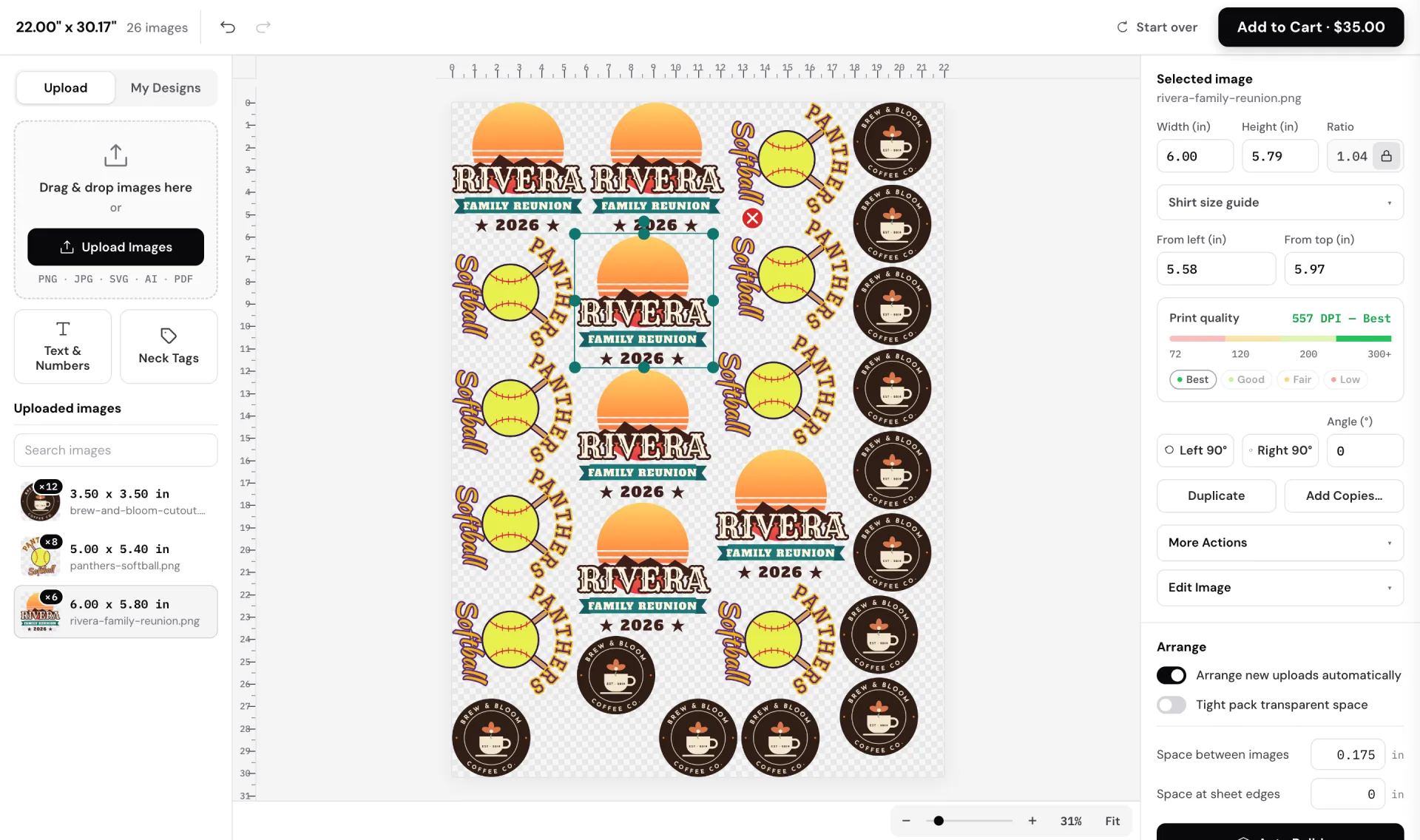
Same builder, more room. Auto Build lays out the sheet, and every design can still be resized, rotated, duplicated or moved by hand.
Features
A list of cards, one per design, sized for thumbs. No canvas to wrestle on a small screen.
Auto Build, Fill Sheet, crop, rotate, mirror, duplicate, and undo for anyone who wants control.
Spots the white box behind a logo and offers to remove it in one tap.
AI upscaling for low-resolution images, so a screenshot logo has a chance to print clean.
Add lettering or build a neck tag without leaving the builder.
Customers sign in with their email to reopen a sheet and reorder. No account needed to build.
Nests designs by their real shapes, not their boxes, and never closer than the gap you set.
Every design shows Best, Good, Fair or Low. Problem art is outlined right on the sheet.
Soft-hand halftones with clean edges, and knockout for the shirt color.
Order labels on the sheet and a filename template you control, so files sort themselves.
When the art won't fit one sheet, it continues on the next one automatically.
Fixed sheet sizes or a rolling sheet, priced per size, per inch, per square inch or per square foot.
Print quality
EZGangIt measures every design at the size it will print and tells the customer in plain words. Low-resolution art is outlined on the sheet, and a quality check runs before the cart.
Runs inside Shopify
Sign-in and billing go through your Shopify admin.
One click from the setup guide opens your theme editor with the builder switched on. Works with Online Store 2.0 themes like Dawn and Horizon.
Set widths, lengths and your pricing, and EZGangIt creates the products.
Open the order, download the sheet, send it to your RIP.
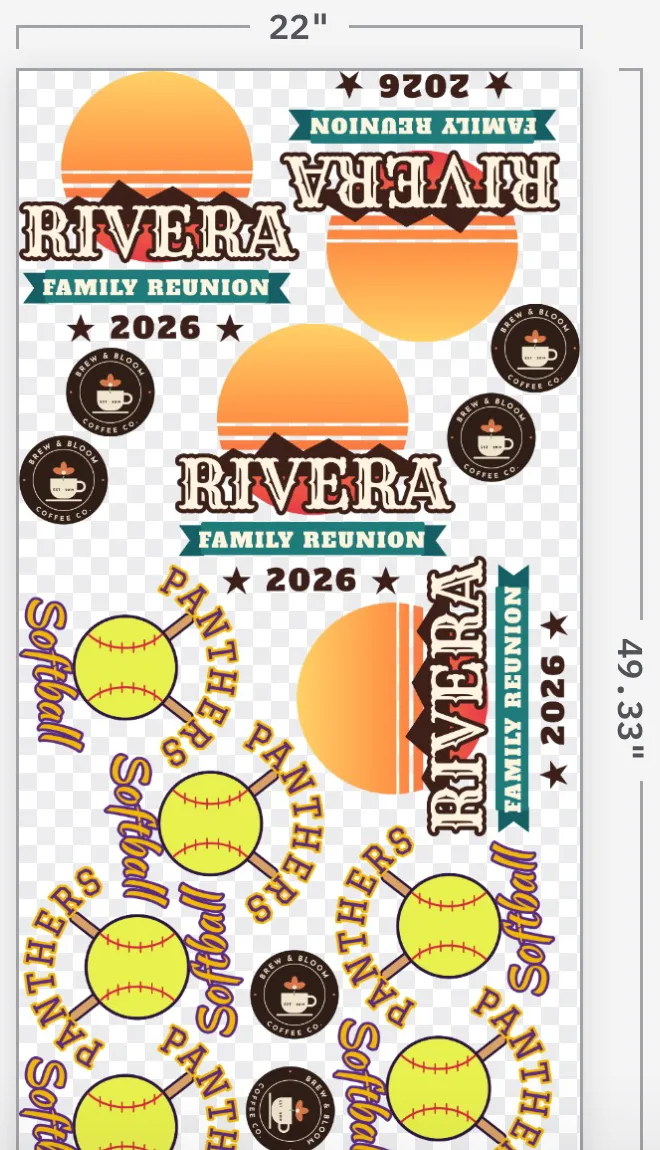
22″ × 49.33″ · 22 designs
1042_Rivera_1-of-1.png
Example order. Label contents and filename are set in your settings.
Pricing
Start free and pay a small fee per order, or pick a monthly plan with square feet included. Charges show up on your Shopify bill, and you approve a monthly usage cap that can't be exceeded.
AI tools are optional on every plan: $0.10 per background removal and $0.50 per enhanced order, billed only for paid orders. You choose whether your customers pay them at checkout.
$0/ month
3% per order, $0.15 minimum, $10 maximum
For new and part-time shops
$129/ 30 days
1,800 sq ft included, then 2% on orders past it
≈ 117 sheets at 22″ × 100″
For steady weekly volume
$249/ 30 days
5,000 sq ft included, then 1% on orders past it
≈ 327 sheets at 22″ × 100″
For busy shops with daily runs
$699/ 30 days
Unlimited sq ft, no order fees
Fair use up to 50,000 sq ft / month
For high-volume production
| Plan | You pay / month | Share of sales |
|---|
Estimate, before taxes. A square foot is 144 square inches, so a 22″ × 60″ sheet is 9.2 sq ft.
FAQ
Shopify stores on an Online Store 2.0 theme, such as Dawn or Horizon. The builder appears on your product pages through a theme app block, so there's no theme code to edit. Ask us about other platforms.
No. Anyone can build a sheet and check out. Customers who want to reopen a saved design sign in with their email.
PNG, JPG, PDF and SVG are on by default, and you can also allow WEBP, AI and EPS. Vector and PDF files are converted at 300 DPI.
A 300 DPI PNG for each sheet, attached to the order in your Shopify admin. You choose the filename template and whether an order label prints at the top or bottom of the sheet.
Your way. Sell fixed sheet sizes at a flat price, or a rolling sheet priced per linear inch, per square inch or per square foot, with an optional minimum charge.
Through Shopify. Plan fees and usage fees appear on your Shopify bill. When you choose a plan, you approve a monthly usage cap in Shopify, and charges can never go past it. You can change plans any time from the app.
Yes. The Free plan has no monthly fee. You pay 3% per gang sheet order, at least $0.15 and never more than $10 per order.
Background removal is $0.10 per image and AI enhancement is $0.50 per order that uses it, on every plan. You're billed only for paid orders. Turn either tool off in Settings, and choose whether your customers pay the fee at checkout or you cover it.
EZGangIt is heading to the Shopify App Store. Email us and we'll send you the install link and help you set up your first gang sheet product.